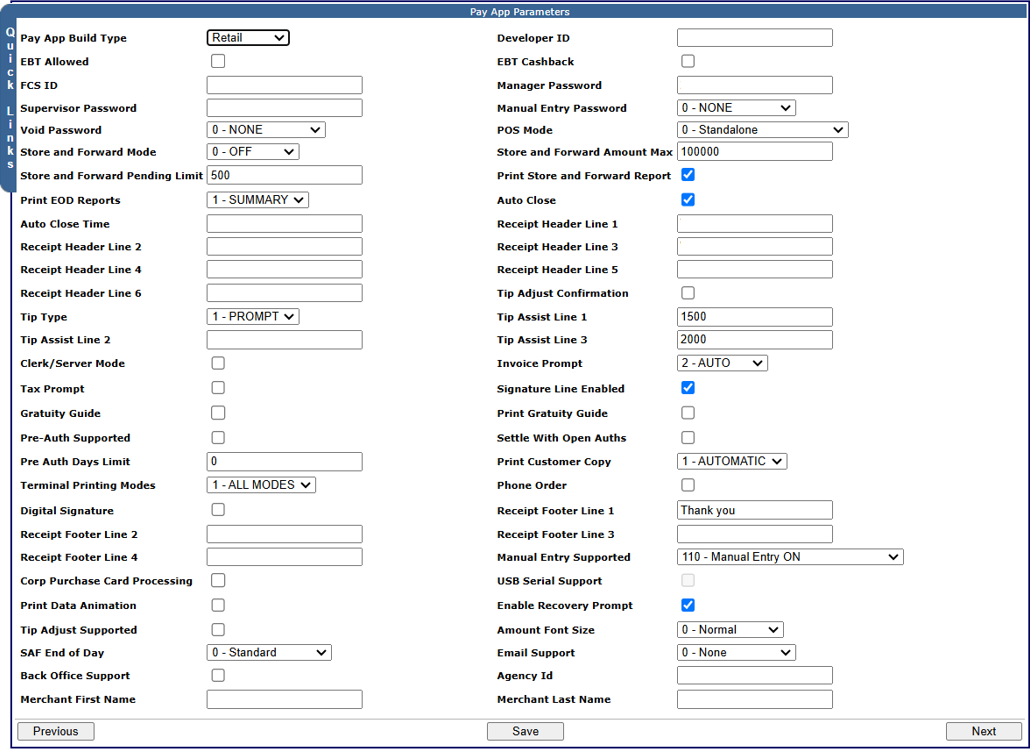
Pay App Parameters
Terminals set up for Pay App for a merchant are initially enabled and configured on the Terminal Setup page, in the  PAYAPP HWSW Information panel. Additional parameters for Pay App terminals are configured on the Pay App Parameters page.
This panel enables you to configure the hardware and software options for Pay App products by selecting values in these fields. Additional parameters for Pay App terminals are configured on the Pay App Parameters page.
- Pay App Flag: When this check box is selected, the other fields in the panel become available enabling Pay App configuration.
- Pay App Manufacturer: The name of the terminal Pay App manufacturer.
- Pay App Model: The name of the terminal Pay App model in use.
Pay App Type: The available options are:
- 01 - NoPIN NoDebit
- 02 - All CVM No Debit
- 03 - All CVM
- 04 - Cash Advance
Pay App Config: The type of Pay App configuration.The available options are:
- SA - Standalone
- SI - Semi Integrated
- RE - Genius Restaurant
- OR - Genius CNTR
- OT - Genius ESSN
- Pay App Version: The build label to use for the UPA application ID in the UDS UpdateTerminalApplication request.
- PIA Version: The UDS build label to use for the PIA application ID in the UDS UpdateTerminalApplication request.
- Downloader Version: The UDS build label to use for the Downloader application ID in the UDS UpdateTerminalApplication request.
- Firmware Version: The UDS build label to use for the Firmware application ID in the UDS UpdateTerminalApplication request.
- Ovation Version: The UDS build label to use for the Geinus application ID in the UDS UpdateTerminalApplication request.
- ISV Version: The UDS build label to use for the ISV application ID in the UDS UpdateTerminalApplication request. This is only needed if there is an ISV Android application that needs to be loaded on the terminal to run alongside UPA.
Note: The fields that are made available on this page will depend on other configuration options selected.
To configure Pay App parameters:
- From the Terminal Details page, select Next
-or-
From Quick Links. select Pay App Parameters.
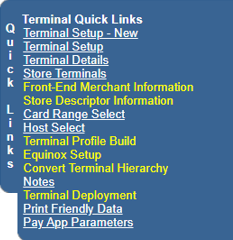
The Pay App Parameters page opens.
- Enter or select the required values in these fields:
- Agency ID: This field is required for boarding to Ovation Back Office. When selected, it indicates that the merchant portfolio segregation is typically identified by BIN.
- Amount Font Size
The selection in this field determines the font size for the amount printed on the receipt. The available options are:
- 0 - Normal
- 1 - Double High
- Application Mode
The selection in this field defines whether the device is configured for retail or restaurant processing. The available options are:
- 0 - Retail
- 1 - Restaurant
- Auto Close: If selected, the terminal will auto-close its batch at the Auto Close Time specified.
- Auto Close Time
The daily automatic end of day processing time in 24-hour HHMMSS format. This value is only used if Auto Close is selected.
Note: If Auto Close is selected but no Auto Close Time is specified. the results are undefined.
- Back Office Support: If selected, this indicates that the merchant is subscribed to a back office service.
- Clerk/Server Mode: If selected, the clerk/server entry mode is enabled, requiring a clerk or server to enter their ID to perform transactions on the device.
- Corp Purchase Card Processing: If selected, the terminal will support corporate purchase card processing.
- Developer ID: The unique identifier assigned by Global Payments during the certification process for this terminal configuration. This field is mandatory.
- Digital Signature: If selected, the terminal will support digital signatures.
- EBT Allowed: If selected, the terminal can process Electronic Benefits Transfer (EBT) transactions, such as food stamp and cash benefit transactions.
- EBT Cashback: If selected, the terminal can process Electronic Benefits Transfer (EBT) cashback transactions.
- Email Support
The selection in this field determines how the email and text feature will be supported. The available options are:
- 0 - None: Neither email nor text is supported.
- 1 - Email: Email is supported.
- 2 - Text: Text is supported.
- 3 - Email and Text: Both email and text are supported.
- Enable Recovery Prompt: If selected, the recovery prompt displays when the terminal receives a time-out from the payments application.
- FCS ID: The merchant's Food and Consumer Service (FCS), Supplemental Nutrition Assistance Program (SNAP), or Electronic Benefits Transfer (EBT) program identification number. This number is issue to the merchant by the state government and indicates that the merchant is certified and approved to accept food stamps.
- Gratuity Guide: If selected, the application will prompt the user for a tip with gratuity guidelines. The Tip Assist Line 1, 2, 3 fields values are used to define the gratuity guide options. The No Tip and Other options are also included in the prompt by default.
- Invoice Prompt
The selection in this field determines how the application prompts the user to enter an invoice number when processing a transaction. The value cannot be changed if there is an open batch. The available options are:
- 1 - MANUAL: The invoice number must be entered, cannot be blank or bypassed, and must be unique in the current batch and greater than 0.
- 2 - AUTO: The invoice number counter resets back to 1 after end of day, whether manual or auto.
- Low Battery Percentage: The percentage of remaining battery charge at which the device will display a warning prompting the user to charge the device. The merchant should verify the remaining battery charge as part of the initial check before processing a transaction.
- Manager Password: The password used to gain access to a manager function.
- Manual Entry Password
The selection in this field determines whether a password must be entered when a card number is manually entered, and if so, the password level required. The available options are:
- 0 - NONE: No password is required.
- 1 - SUPERVISOR: A supervisor level password is required.
- 2 - MANAGER: A manager level password is required.
- 3 - ADMIN: An administrator level password is required.
- Manual Entry Supported
The selection in this field determines the manual card number entry mode for the terminal. The available options are:
- 110 - Manual Entry ON
- 100 - Manual Entry OFF
- 111 - Manual Entry and QR Code Scan
- Merchant First Name: The merchant's first name. This is required if email receipts are supported, and is printed at the top of the email receipts.
- Merchant Last Name: The merchant's last name. This is required if email receipts are supported, and is printed at the top of the email receipts.
- Minimum Battery Percentage: The minimum percentage of remaining battery charge that will allow the device to process a transaction. The merchant should verify the remaining battery charge as part of the initial check before processing a transaction.
- Minimum Surcharge Amount: The minimum surcharge amount that can be applied.
- Pay App Build Type: The selection in this field determines whether this is a Restaurant or a Retail configuration for the terminal.
- Phone Order: If selected, the terminal will display the Phone Order menu option and support phone order functionality.
- POS Mode
The selection in this field determines the operation mode of the payment application, whether it is running side-by-side with an external third-party point of sale application on the same device, or as a stand-alone application. The available options are:
- 0 - Standalone
- 1 - Semi-Integrated External
- 2 - Fully-Integrated
- 4 - Semi-Integrated Internal
- Pre Auth Days Limit: The number of days that a PreAuth/OpenTab hold remains available before it is deleted during end-of-day processing. If the value is 0, any PreAuth/OpenTab hold that is not Completed/Closed is deleted automatically by end of day.
- Pre-Auth Supported: If selected, the application:will support the PreAuth/Open tab, the Delete Pre-Auth/Delete tab, and the Completion/Close tab.
- Print Customer Copy
The selection in this field determines whether a customer copy of the receipt is printed for transactions that require both a merchant and a customer copy, and that the two copies can be separated by tearing when printed. The available options are:
- 0 - NONE: A customer copy of the receipt is not printed
- 1 - AUTOMATIC: A customer copy of the receipt is automatically printed
- 2 - PROMPT: A prompt is displayed asking the customer if they want a copy of the receipt printed.
- Print Data Animation: If selected, the terminal displays the printing animation while the terminal is printing.
- Print EOD Reports
The selection in this field determines whether an end of day (EOD) report prints during both manual and auto settlement, and if so, the type of report printed. The available options are:
- 0 - NONE: A basic receipt prints instead of a report.
- 1 - SUMMARY: A summary report prints.
- 2 - DETAIL: A detail report prints.
- 3 - BOTH: Both a detail and a summary report prints.
- Print Gratuity Guide: If selected, the application will print the Tip Assist Line 1, 2, or 3 field value on the printed receipt,
- Print Store and Forward Report: If selected, the Store and Forward reports are printed when batch authorization occurs.
- Provisional Handling: If selected, this indicates that Provisional Reversal transactions are supported.
- Receipt Footer Line 1, 2, 3, 4: The receipt footer lines (1 through 4) that are printed on the merchant and customer receipts. Entries in these fields are configured by Global Payments and cannot be edited.
- Receipt Header Line 1, 2, 3, 4, 5, 6
The receipt header lines (1 through 6) that are printed on the merchant and customer receipts. Entries in these fields are configured by Global Payments and cannot be edited. The first four lines are typically used as follows:
- Receipt Header Line 1: The merchant's name.
- Receipt Header Line 2: The merchant's street address.
- Receipt Header Line 3: The merchant's city, state, and ZIP code.
- Receipt Header Line 4: The merchant's phone number.
- Restart PIA After EOD: If selected, the application will reboot after an auto end-of-day.
- SAF End of Day
The selection in this field determines the action taken for Store and Forward (SAF) transactions after end-of-day processing. The available options are:
- 0 - Standard: All SAF transactions are deleted.
- 1 - Double High: All declined SAF transactions are retained, and all approved SAF transactions are deleted.
- Settle With Open Auths: If selected, this enables the terminal to process an auto settlement with open tabs in the batch.
- Signature Line Enabled: If selected, a signature line is printed on the receipt.
- Store and Forward Amount Max:The maximum amount in cents that can be used for a Store and Forward transaction.
- Store and Forward Mode
The selection in this field determines the mode to be used for the Store and Forward (SAF) function. The available options are:
- 0 - OFF: The SAF function is turned off.
- 1 - Always: An SAF eligible transaction is always stored.
- 2 - Prompt: If a communication error occurs, a prompt is displayed for an SAF-eligible transaction that allows the user to store the transaction or treat it as declined.
- 3 - Auto: If a communication error occurs, the device will automatically store an SAF-eligible transaction.
- Store and Forward Pending Limit: The maximum number of pending unauthorized transactions that can be stored in a batch.
- Supervisor Password: The password used to gain access to a supervisor function.
- Surcharge Fee Percentage: The percentage amount used to calculate the surcharge fee that is automatically applied to the total amount (base amount plus tip) on consumer and commercial credit card sales.
- Tax Prompt: If selected, the application will prompt the user to enter the tax when processing a transaction.
- Terminal Printing Modes
The selection in this field determines whether the printing modes are enabled for the terminal. The available options are:
- 0 - DISABLED: Printing modes are disabled for the terminal.
- 1 - ALL MODES: All printing modes are enabled for the terminal.
- Tip Adjust Confirmation: If selected, a confirmation prompt displays when a transaction tip is adjusted using the Tip Adjust command or the Add Tip menu option.
- Tip Adjust Supported: If selected, the Tip Adjust function is supported.
- Tip Assist Line 1, 2, 3: Each field (for line 1, 2, and 3) can contain a 2-decimal percentage value used to calculate a suggested amount that is printed on the merchant and customer receipts that the customer could add as a tip.
- Tip Type
The selection in this field determines whether a prompt asking the customer if they want to add a tip displays on the device or printed on the receipt. The available options are:
- 0 - OFF: No prompt displays.
- 1 - PROMPT: A prompt asking the customer if they want to add a tip displays on the device screen.
- 2 - PRINT: A line for the customer to add a tip is printed on the receipt.
- Training Mode: If selected, the device operates in training mode, in which transactions are not saved in the database and are not sent for authorization.
- Transaction Status Confirmation: If selected, the confirmation button on the Transaction Status screen becomes available.
- Transaction Status Prompt
The selection in this field determines whether the Transaction Status screen displays the transaction’s status. The available options are:
- 0: OFF
- 1: Success and Failure
- 2: Success Only
- 3: Failure Only
- USB Serial Support: If selected, the terminal will support serial communication.
- Version Number: The software version number assigned during the certification process. The value in this field is required for ISV terminal files to ensure that the appropriate application version is being used for the ISV merchant files.
- Void Password
The selection in this field determines whether a password must be entered when a transaction is voided, and if so, the password level required. The available options are:
- 0 - NONE: No password is required.
- 1 - SUPERVISOR: A supervisor level password is required.
- 2 - MANAGER: A manager level password is required.
- 3 - ADMIN: An administrator level password is required.
- Select Save or Next as required.